
From Crochet Patterns to Code: Building a Pattern Studio
Teddy wanted a better way to turn her handwritten crochet patterns into something she could share. So we started building a Pattern Studio around the way she actually works.
My partner, Teddy, loves crochet. She works on projects day in and day out, and recently I’ve noticed she’s been writing down her patterns so she can replicate them later. She’s also been digging through old craft manuals and magazines, subscribing to fiber arts newsletters, and generally surrounding herself with as much inspiration as she can find. Having access to all those patterns eventually got her interested in sharing some of her own.
The only thing we couldn’t quite figure out was how to turn her handwritten patterns into something digital. Something people could comfortably read on their phone or computer, or download and print out to follow along at home.
I started noticing that a lot of her handwritten instructions almost looked like machine language. Abbreviations, numbers, repetitions, references to previous steps. It was practically code already, just written for someone holding a crochet hook instead of a computer.
And that got me thinking…
What if I could take the patterns she’s already writing, translate that structure into code, and build an application that helps her turn those notes into finished, publishable patterns?
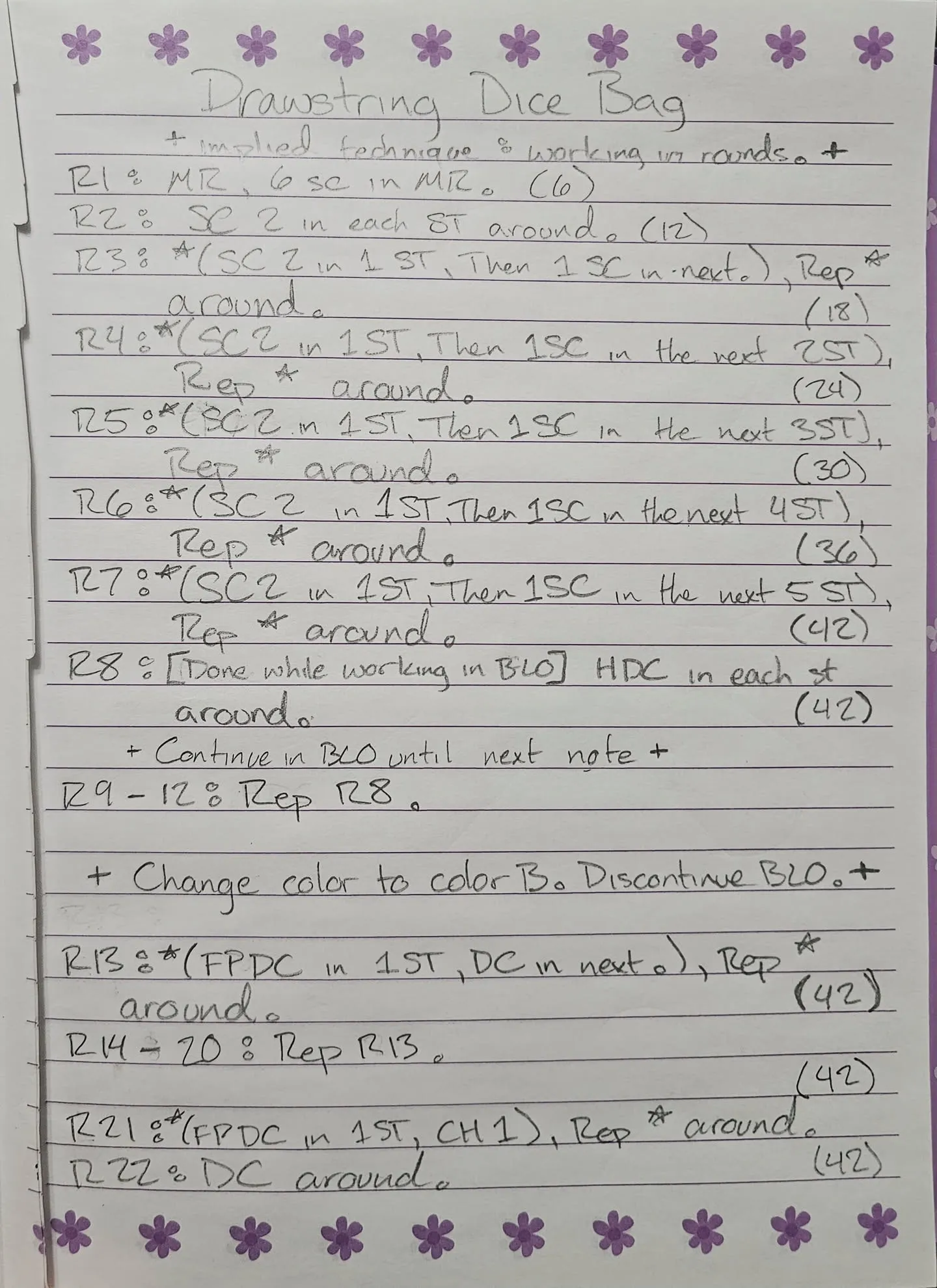
The handwritten pattern for Teddy’s recently completed Drawstring Dice Bag.
Making room for the way Teddy works
Naturally, I started looking into what already existed. There are some pretty neat tools out there for fiber artists, but nothing we found really lined up with what Teddy was imagining. Some were great for writing instructions, others for generating stitch charts, and others for laying out printable documents. What she wanted was a way to bring all of those things together without having to bounce between several different programs.
So, as one does, I started planning another project.
Initially, I found myself exploring all kinds of possibilities. Automatic handwriting transcription, stitch-count validation, and other features that could potentially make the process easier. The more I looked into it, the more interesting the technical side became, and I started thinking about just how much we could reasonably automate.
But after talking it through with Teddy, it became pretty clear that I was approaching the problem from the wrong direction.
She’s already figured out how she likes to design her patterns. She experiments with her yarn and hooks, writes things down as she goes, makes adjustments, and eventually settles on something she’s happy with. There was no reason to interfere with that process. What she needed was a way to take the finished instructions and make them look as good as the projects themselves.
And, more importantly, she wanted the freedom to decide what that looks like.
We eventually settled on a two-part workflow, with a few additional tools to help bring everything together.
Writing in the Pattern Workshop
The first part is what we’re calling the Pattern Workshop, essentially a text editor built around the way crochet and knitting instructions are written. She can type out her rows and rounds, organize them however she likes, and use specialized shortcuts without being forced into rigid forms or templates. The goal is to make writing a pattern feel just as natural as writing it in her notebook, with a few extra conveniences that paper can’t really provide.
One of those conveniences is the ability to recognize the structure of her instructions. Rounds, stitch counts, and repeated sequences can be identified without forcing her to change the way she writes. That gives us a foundation for some of the more interesting functionality elsewhere in the application.
We’ve already got her dice bag pattern loaded into the Workshop, and it’s been pretty neat seeing those original handwritten instructions take shape inside an actual editor.
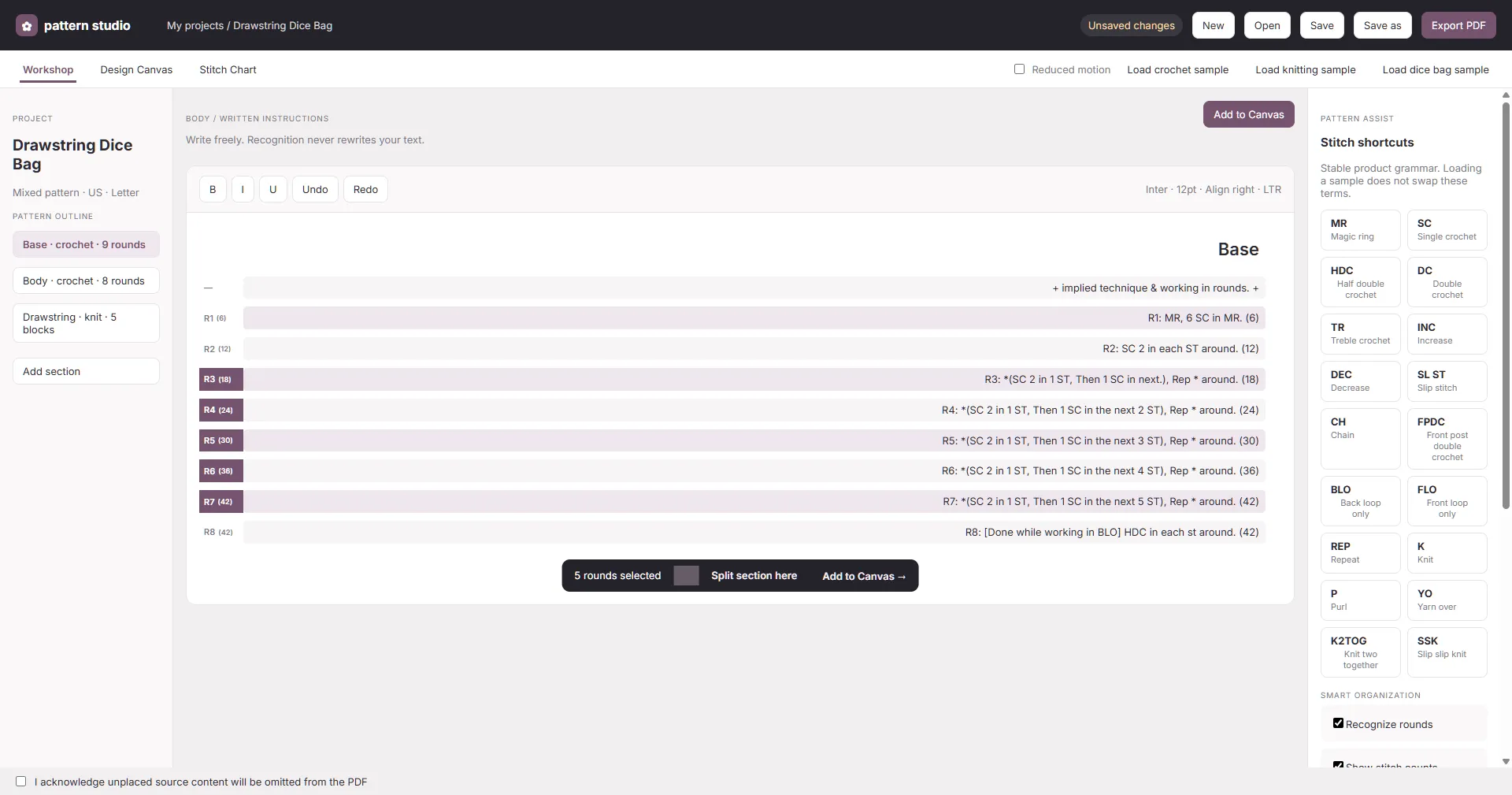
The Pattern Workshop, with rounds from Teddy’s Drawstring Dice Bag pattern selected for layout.
Bringing the pages together
Once she’s happy with the instructions, she can move them into the Design Canvas, which we’re approaching a little more like a traditional graphic design application. She can arrange groups of instructions alongside photographs, illustrations, and stitch charts, resize and reposition everything, and build the pages however she wants.
One of the more interesting challenges here is keeping those two workspaces connected. If she notices an error while laying out a page, she should be able to correct it right there without having to go back and edit the original document separately. The instructions remain synchronized, while the layout itself is entirely up to her.
Turning instructions into stitch charts
We’re also building a dedicated Stitch Chart editor, which is where that original observation about patterns resembling code starts to get especially interesting.
Since crochet instructions follow recognizable structures, we can interpret some of those instructions and use them to generate visual diagrams. We’re already experimenting with automatically producing circular charts from the written rounds, then giving Teddy the ability to adjust individual stitch symbols herself.
There’s a surprising amount of geometry involved in making these diagrams, especially with circular patterns, so we’ve also been working on snapping and alignment tools to make positioning everything a little less tedious.
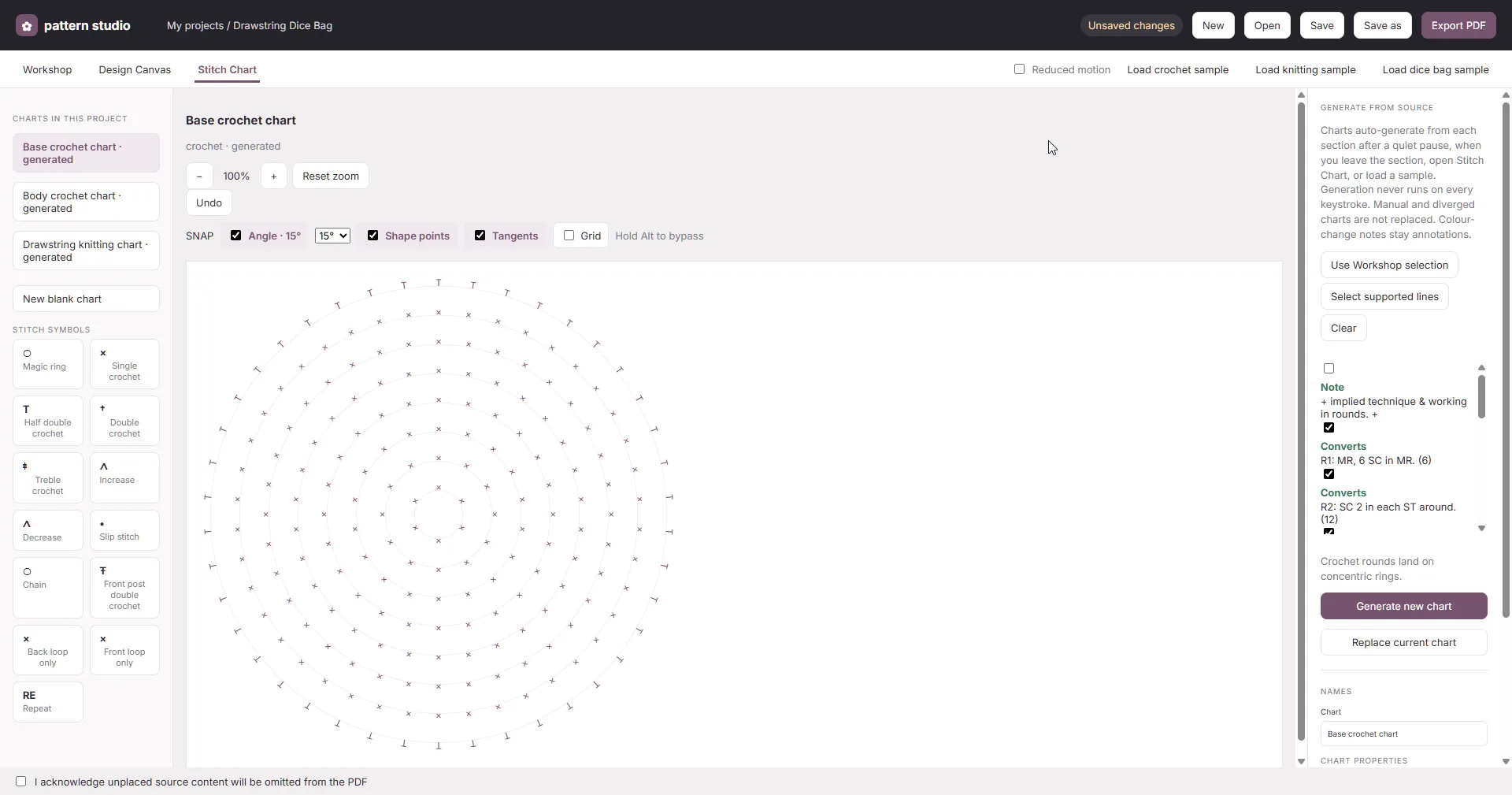
An automatically generated circular stitch chart based on the opening rounds of the dice bag pattern.
Of course, generating a diagram isn’t necessarily the same thing as knowing it’s correct. There are plenty of nuances to how stitches are worked, and some instructions aren’t nearly as straightforward as they might appear. We’re approaching that functionality with the understanding that Teddy should always have the final say over how her patterns are interpreted.
A pattern she can share
Ultimately, the goal is to bring everything together into a printable PDF that she can share or sell, with the freedom to make it as simple or elaborate as she wants.
There’s still plenty of work ahead of us, but having Teddy’s finished dice bag pattern as our first real test case has been incredibly useful. Rather than designing everything around hypothetical examples, we’re getting to work with something she actually made.
I’m looking forward to seeing how it develops. Maybe it’ll eventually become something other fiber artists find useful, too. But for now, I’m just enjoying the opportunity to build something that helps Teddy share a little more of what she loves doing.